

Hilarionbet App and Mobile Version
A guide for players who deposit, bet and sit at live tables from a phone: which setup to choose, how to install it safely and how to keep the cashier error-free on a small screen.
Hilarionbet app options cover three ways to reach the same account on a phone: the mobile browser, a home-screen shortcut (PWA) and an Android APK. The interface is built mainly for players in Turkey, while this English version works as a language version for everyone else. This page is for players who use their phone more than a computer. It explains which setup fits which player, how to complete the Hilarionbet APK download safely on Android and what iPhone users use instead of a store app. Because the site’s domain is blocked and replaced from time to time, home-screen shortcuts also need updating, and that is covered in its own section. You must be 18 or over to open an account. If gambling stops being fun, free help is available from GambleAware at begambleaware.org or on the National Gambling Helpline, 0808 8020 133.
Hilarionbet Mobile Version Overview
All three routes use the same account, balance and cashier; they differ only in installation, updates and notifications. The mobile site arranges every desktop section — sportsbook, live betting, slot lobby, live casino, promotions and live chat — in a vertical menu that works one-handed. Whether you choose the Hilarionbet app download for Android or simply bookmark the site, your bets and bonus progress are the same everywhere.
- Access routes
- Mobile browser, PWA shortcut, Android APK
- Android
- APK from the platform’s own link
- iPhone (iOS)
- Add to Home Screen in Safari (PWA)
- Store listing
- Google Play / App Store listing could not be confirmed
- System requirements
- Android 8.0+ (2 GB RAM), iOS 12.0+
- Cashier
- Same methods as on desktop
- Information date
- 10 November 2026
The table lists only what could be verified. The choice comes down to how often you play. Someone who logs in once or twice a week is fine with the browser, while a daily live bettor may prefer the Hilarionbet casino app for Android because of notifications and automatic redirection to new addresses.
Fast Deposits from Your Phone
The focus of this guide is depositing from a phone. The mobile cashier is identical to the desktop one: the same methods, limits and transaction history. The difference is that a small screen makes mistakes easier, so three things deserve attention.
- Copy and paste: use the cashier’s copy button for card references or crypto wallet addresses instead of typing them; a single wrong character sends the money elsewhere.
- Network choice: when sending USDT, select exactly the network shown in the cashier (for example TRC20) in your wallet app.
- Switching apps: when you jump to a banking or wallet app and come back, the cashier session may refresh; check the amount and reference again.
The cashier works the same way for Hilarionbet android and Hilarionbet ios users: method list, limits and history match the desktop version. Card deposits may trigger a confirmation step in your banking app. Crypto deposits appear after network confirmations; with wallets that support QR codes, scanning the code in the cashier is even safer than copying the address. E-wallets are usually the fastest to arrive but may ask for separate verification. A small first deposit with a new method shows you how long it takes and keeps the cost of any mistake low. Full steps are in the payments guide.
APK Safety and Permissions
Installing an APK on Android means installing an app from outside Google Play, so the source of the file matters above everything. Use only the Hilarionbet download link on the platform’s own mobile page. Files circulating on forums, Telegram groups or “mod” sites may have been altered and can contain code that harvests login details.
During installation Android asks you to allow your browser to “install unknown apps”. Keep this permission on only while installing and switch it off afterwards. A gambling app normally needs internet access and notifications. A file that requests contacts, SMS reading, call logs or accessibility services is suspicious and should not be installed.
Two simple checks help confirm a file is genuine: make sure the download page shows the correct domain in the address bar, and keep Play Protect scanning switched on before installation. Android users often ask “a warning appeared — should I continue?” The answer depends on the source: if the file came from the official link, the warning is the standard one Android shows for any installation outside Google Play.
Mobile Browser vs PWA App
If you do not want to install anything, the browser and the PWA shortcut are enough. The table compares the three options:
| Criterion | Mobile browser | PWA shortcut | Android APK |
|---|---|---|---|
| Installation | None | Add to home screen | File downloaded and installed |
| Updates | Automatic | Automatic | New versions may need manual install |
| Notifications | No | Depends on browser support | Yes |
| Storage | Browser cache only | Very little | Tens of MB, depending on version |
| Address change | Open new address manually | Re-add the shortcut | App usually redirects itself |
| Best for | Occasional players | iPhone and Android users | Frequent Android players |
The biggest difference between the PWA and the Hilarionbet app download shows when the address changes. The browser and the shortcut stay tied to the address they were saved with, so after a domain change the shortcut tries to open the old site. The APK usually redirects to the new address by itself. That is why most Hilarionbet mobile login problems come from shortcuts that still point to an old domain. Storage figures vary by version, so we cannot give an exact number.
Mobile Casino Interface Review
The mobile interface is built around a bottom tab bar and a slide-out menu in the top left. The tab bar holds shortcuts to sports, live betting, casino, the bet slip and the account; the slide-out menu contains promotions, the cashier, transaction history and support. The screenshot below highlights where the menu sits.
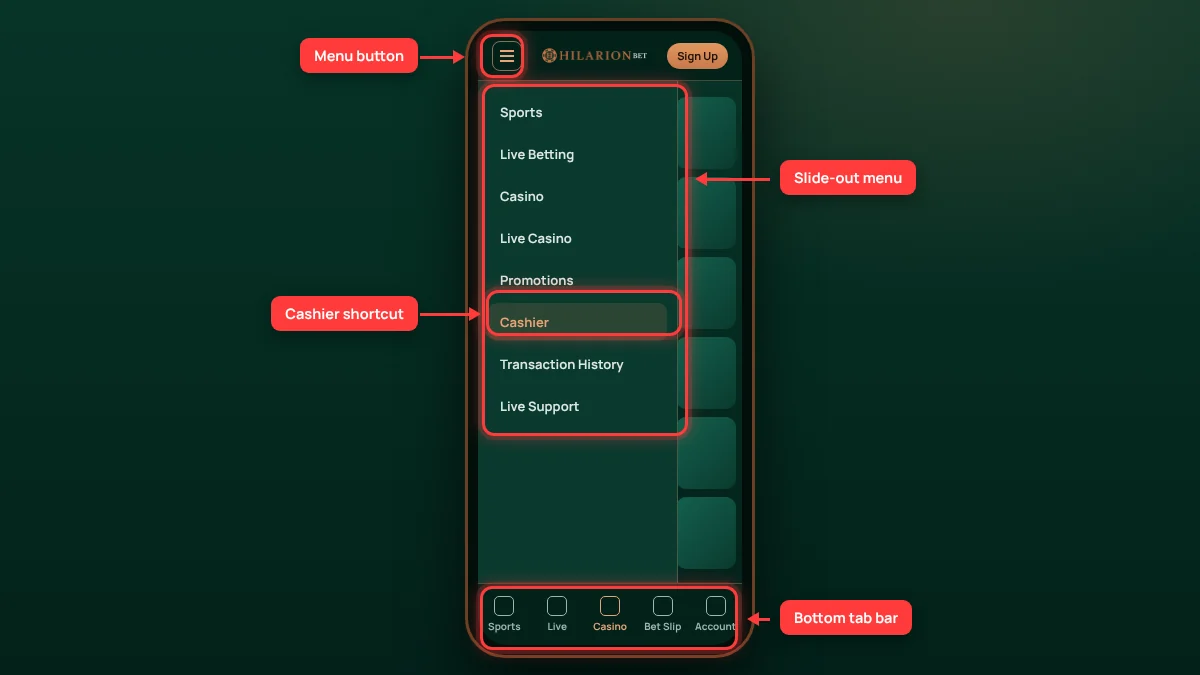
In the casino lobby, a search box sits at the top, followed by category tabs (popular, new, slots, crash, live casino) and a provider filter. Tapping a game card shows demo and real-money options. Turning the phone sideways opens slots in full screen, while live tables keep the video at the top and the betting area below.
Visually, the Hilarionbet casino app and the mobile site are almost identical: the menus and game list are the same. The APK adds notifications and automatic switching to a new address. If those two features do not matter to you, the browser is perfectly adequate. One weakness of the interface is that method limits in the cashier are shown in small print, so it is worth zooming in before confirming a transaction. The account menu groups transaction history, bonus status and responsible gaming settings together, so you do not need a computer to set limits.
Hilarionbet Android Installation Steps
Installing on Android takes a few minutes. The steps below follow the official flow on the platform’s mobile page:
- 1
Open the current Hilarionbet address in your phone browser.
- 2
Go to the “Mobile App” section in the menu.
- 3
On Android, download the APK and allow installation.
- 4
On iPhone, use Safari “Share → Add to Home Screen”.
- 5
Open the app, log in and allow notifications.
When you tap the download button, the browser may warn that the file could be harmful; this is the standard warning for any APK installed outside Google Play. Turn the “unknown sources” permission off again after installation. When an update is released the app usually tells you at launch; get the new file from the official link only and install it over the old version, which keeps your session details. After the Hilarionbet APK download is complete, the first launch asks for notification permission; if you do not want promotional alerts, switch them off in the app settings.
Hilarionbet on iOS (iPhone) Guide
APK files do not run on iPhone, and an App Store listing could not be confirmed. For iOS users the route is the PWA shortcut: the site is opened in Safari and added to the home screen, which creates an app icon that opens in full screen.
- 1
Open Safari
Use Safari rather than Chrome or another browser; Add to Home Screen works most reliably there.
- 2
Tap Share
Press the square-with-arrow icon at the bottom of the screen.
- 3
Choose Add to Home Screen
Scroll down the list, tap the option and confirm the shortcut name.
- 4
Log in from the shortcut
Open the site from the new icon and sign in to your account.
The shortcut uses the browser engine, so it never needs updating. When the address changes, delete the old shortcut and repeat the steps with the new address. If you see an App Store app with the same name, do not download it unless the brand announces it on its official channels.
Notifications are the shortcut’s main limit. On recent iOS versions, web apps added to the home screen can send notifications, but permission has to be granted from inside the shortcut. Older versions do not support this, so following your registered email is a more reliable way to catch promotion and address notices. For Hilarionbet ios users, this is the only real difference from the Android version.
Live Betting on Mobile
On the live betting screen odds change within seconds, so the quality of your mobile connection directly affects your bets. If the price has moved by the time a coupon is confirmed, the system asks you to accept the new odds; on a weak connection that confirmation can be delayed and the bet rejected. Knowing the state of the “accept odds changes” setting therefore matters.
After a Hilarionbet mobile login, the live screen shows match statistics, an animated tracker and, for some matches, a live stream. Where cash-out is offered, the amount follows the live odds and can update with a delay of a few seconds on mobile. Switching between Wi-Fi and mobile data can drop the session briefly; if you have an open live coupon, switch after it has been confirmed.
One advantage of the phone is quick-stake presets: frequently used stakes can be saved and selected with one tap. The same convenience also speeds up spending, so it makes sense to set a daily deposit limit in the account settings before you start betting on the move.
Mobile Data and Battery Use
Exact figures depend on the device, screen brightness and type of game, so the following is only a rough guide. The sportsbook and coupons use very little data. Slots download their graphics on first launch and then use less. Live casino and match streams use the most data and battery: depending on video quality, they can consume hundreds of MB per hour.
To save data and battery, lower the video quality at live tables, close unused tabs and leave screen brightness on automatic. If Hilarionbet casino app users limit notifications to promotions and cashier messages, the app does not drain the battery in the background. On a limited data plan, do the Hilarionbet app download and large updates over Wi-Fi. On older phones, choosing RNG tables over live casino saves noticeably on both data and battery. During long sessions, time matters as much as battery; the phone’s screen-time reminder is a simple help.
Mobile Troubleshooting
The most common problems on a phone and how to fix them:
| Problem | Likely cause | Fix |
|---|---|---|
| APK will not install | Unknown-sources permission off or file incomplete | Allow it temporarily and download the file again from the official link |
| App does not open | Old version or blocked address | Install the current version from the Hilarionbet download page |
| Shortcut shows an error | Shortcut opens the old domain | Delete it and add it again with the address from the official channel |
| Game freezes | Weak connection or full cache | Close and reopen the app, clear the cache |
| Cashier will not load | Session timed out | Log out and log back in |
Most fixes in the table take a few minutes. If a problem persists, try opening the site in another browser: if it fails only in the app, the file probably needs updating; if it fails everywhere, the address has probably changed.
If the steps above do not help, share your device model, Android or iOS version and a screenshot of the error in live chat to speed up diagnosis. Never share your password or account details in chat.
FAQ
Is there a Hilarionbet app?
There is an Android APK downloaded from the platform’s own link. An App Store app could not be confirmed; iPhone users rely on a shortcut created with “Add to Home Screen” in Safari. All three options use the same account, balance and cashier, so you can switch between them freely.
Where can I download the Hilarionbet APK?
Only from the official link on the platform’s mobile page. Files shared on forums, social media groups and third-party sites may have been altered. After installation, switch off the unknown-sources permission and check which permissions the app requests before using it.
How do I use Hilarionbet on iPhone?
Open the site in Safari, tap the share icon at the bottom and choose “Add to Home Screen”. The new icon opens the site in full screen and never needs updating. When the domain changes, delete the old shortcut and repeat the steps with the new address.
Are all games available on mobile?
Most slots, crash games and live casino tables are mobile-friendly; a small number of older games may open only on desktop. Whether a game supports mobile is shown on its card. The cashier, promotions and live chat work fully on mobile, so nothing important requires a computer.
Is the cashier different in the app?
No. Deposit and withdrawal methods, limits and transaction history are the same as on desktop. On a phone, take card references and wallet addresses with the copy button, choose the crypto network carefully and check the amount again before confirming to avoid mistakes.
How do I update the APK?
When a new version is released, the app usually shows a notice at launch. Download the current file from the official link again and install it over the old version; this keeps your session details. If no notice appears, check the version information on the mobile page.
On a phone, the most practical route is the APK from the official link for Android and the Safari shortcut for iPhone. The Hilarionbet android version stands out for notifications and automatic redirection, while the Hilarionbet ios shortcut is light and needs no installation. The main reservations are the safety of the file source, refreshing shortcuts after an address change and cashier mistakes on a small screen. Gambling is for adults only; if control becomes difficult, use the tools on the responsible gaming page or call 0808 8020 133.
Information on this page was checked on 10 November 2026. Offers, limits and access addresses may change; the values shown in your account are binding.